

 Set up docs MCP
Goal
In this guide you will learn how to:
- Load the OpenCelliD data in ClickHouse
- Connect Apache Superset to ClickHouse
- Build a dashboard based on data available in the dataset
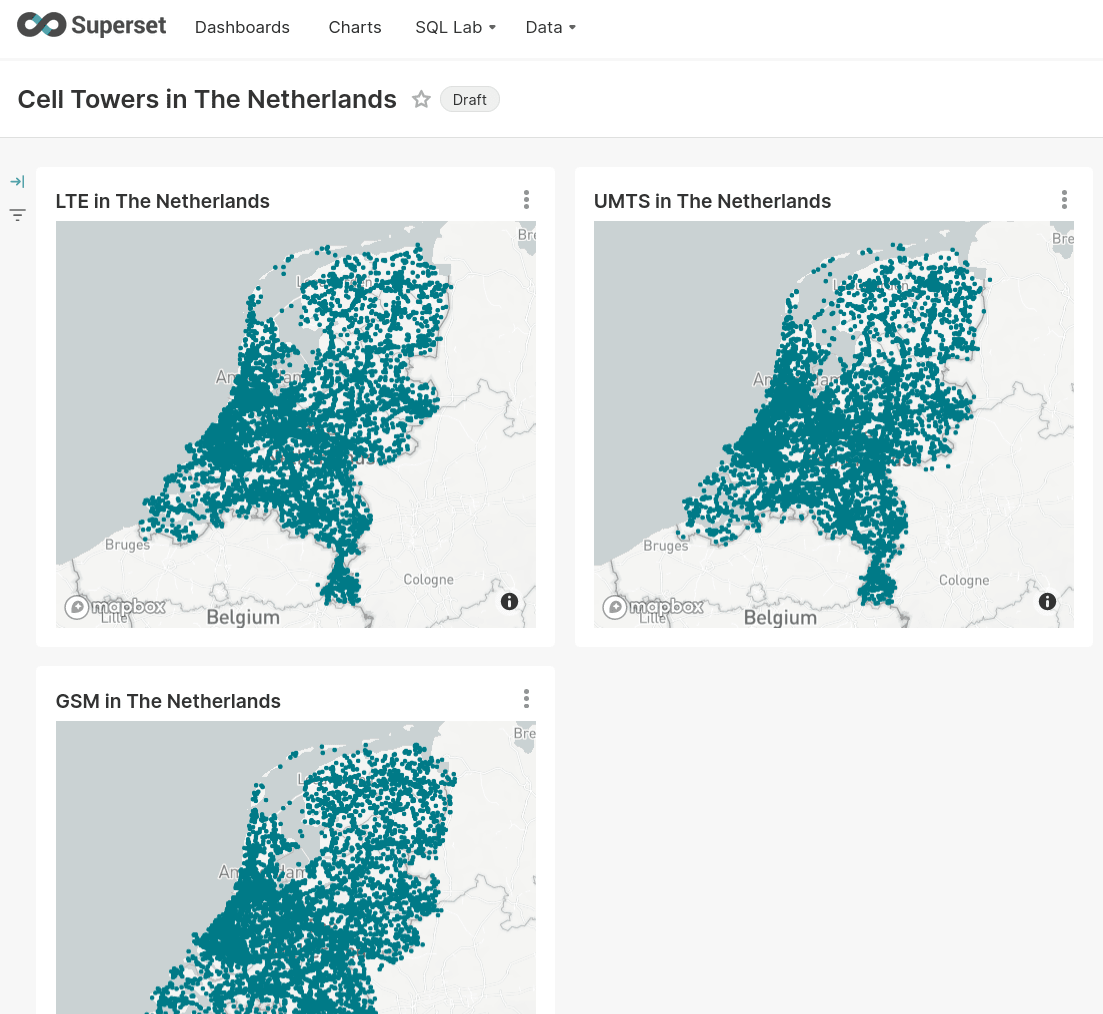
Here is a preview of the dashboard created in this guide:
Get the dataset
This dataset is from OpenCelliD - The world’s largest Open Database of Cell Towers.
As of 2021, it contains more than 40 million records about cell towers (GSM, LTE, UMTS, etc.) around the world with their geographical coordinates and metadata (country code, network, etc.).
OpenCelliD Project is licensed under a Creative Commons Attribution-ShareAlike 4.0 International License, and we redistribute a snapshot of this dataset under the terms of the same license. The up-to-date version of the dataset is available to download after sign in.
Load the sample data
ClickHouse Cloud provides an easy-button for uploading this dataset from S3. Log in to your ClickHouse Cloud organization, or create a free trial at ClickHouse.cloud.
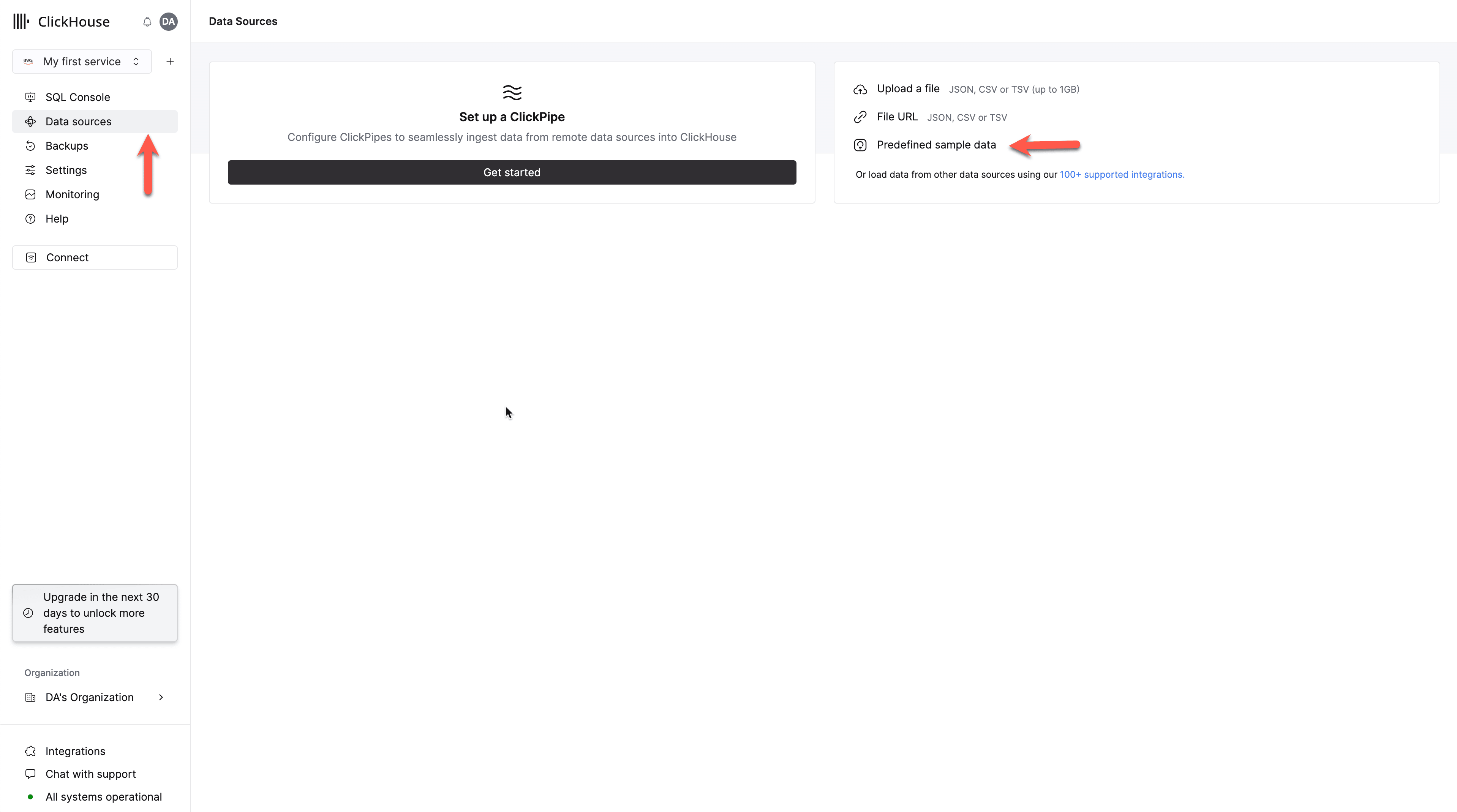
Select your service, followed by Data sources -> Predefined sample data.
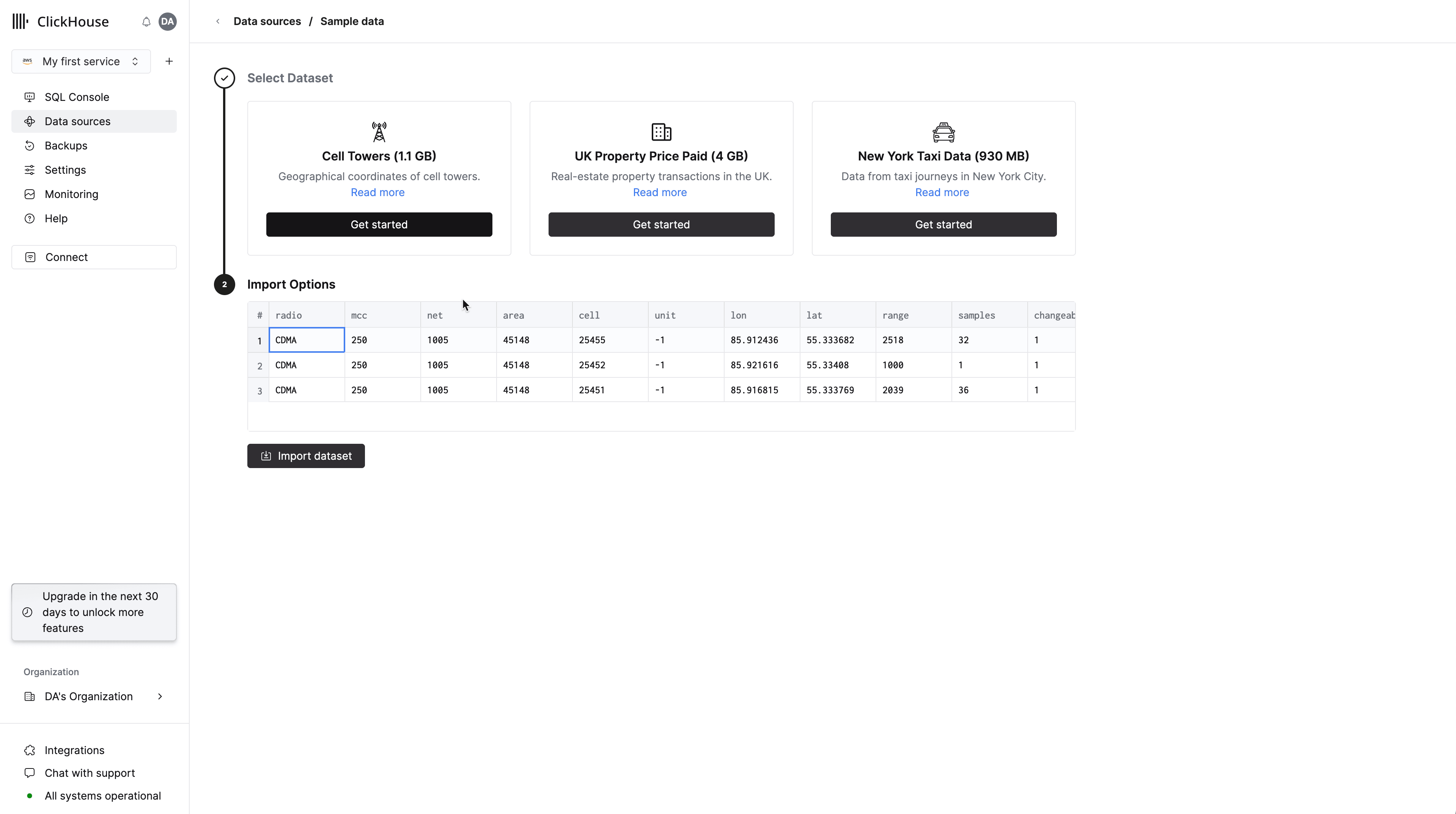
Choose the Cell Towers dataset from the Sample data tab, and Load data:
Examine the schema of the cell_towers table
DESCRIBE TABLE cell_towersConnect to SQL console
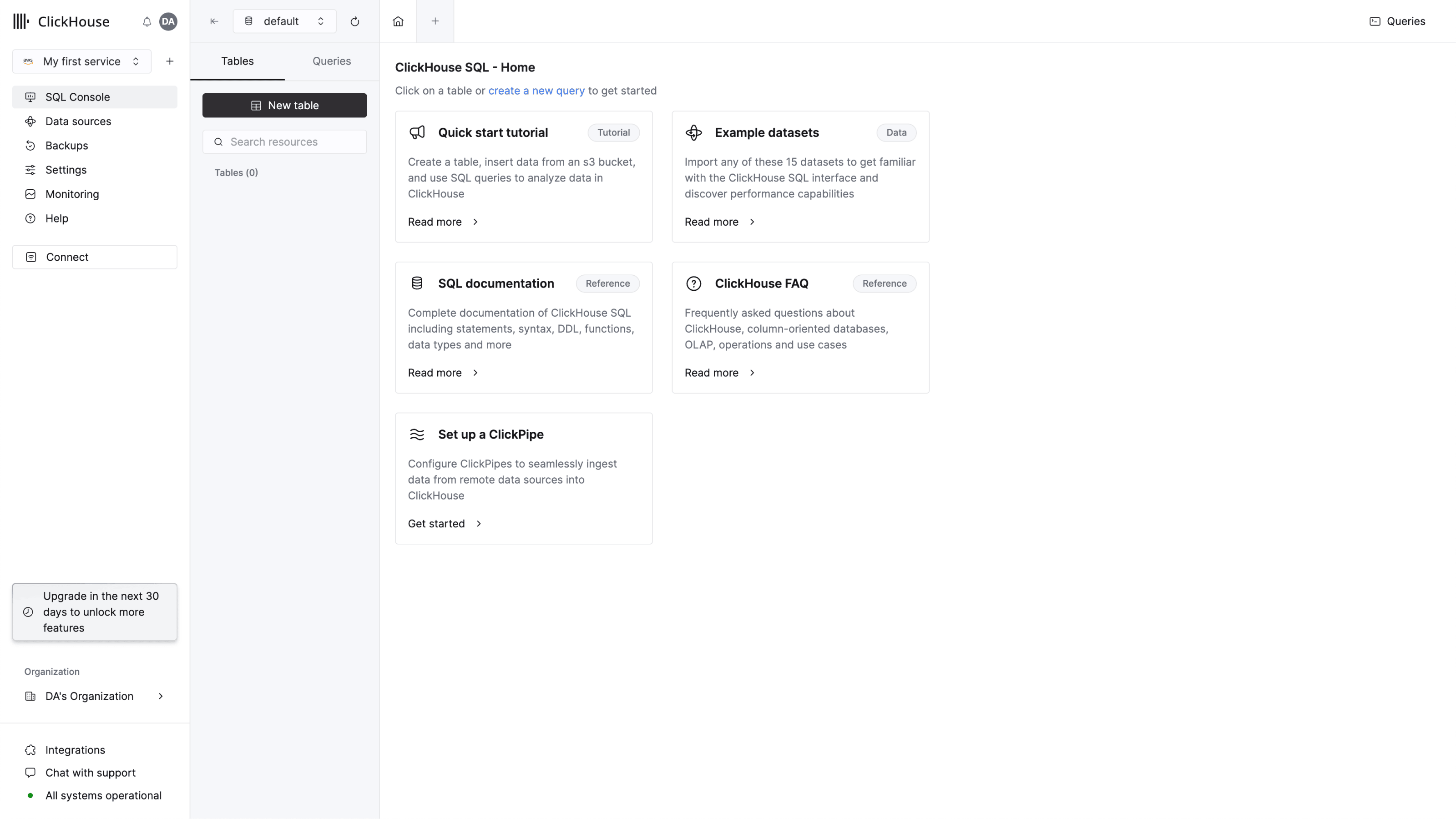
From your ClickHouse Cloud services list, click on a service.
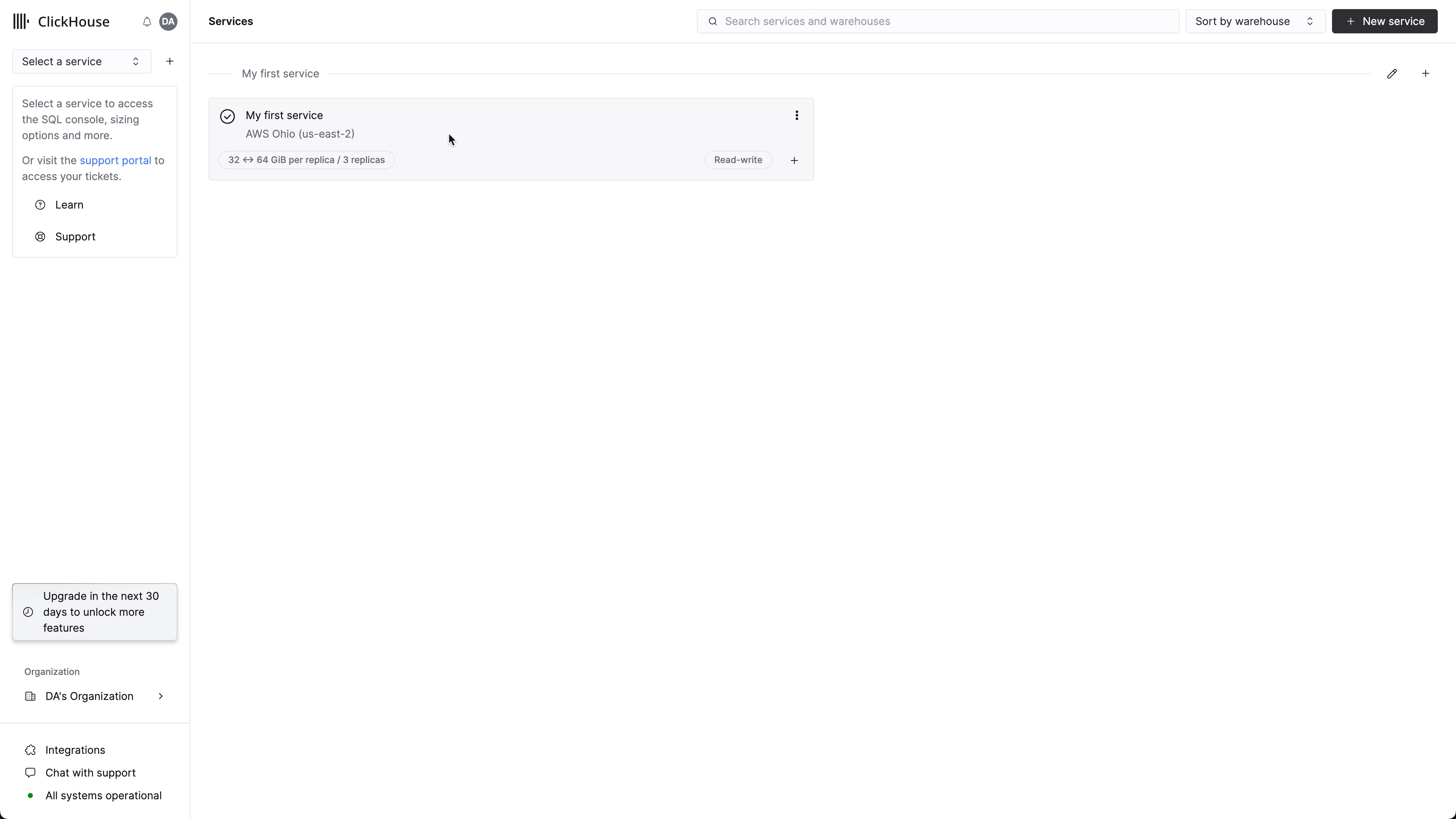
This will redirect you to the SQL console.
This is the output of DESCRIBE. Down further in this guide the field type choices will be described.
┌─name──────────┬─type──────────────────────────────────────────────────────────────────┬
│ radio         │ Enum8('' = 0, 'CDMA' = 1, 'GSM' = 2, 'LTE' = 3, 'NR' = 4, 'UMTS' = 5) │
│ mcc           │ UInt16                                                                │
│ net           │ UInt16                                                                │
│ area          │ UInt16                                                                │
│ cell          │ UInt64                                                                │
│ unit          │ Int16                                                                 │
│ lon           │ Float64                                                               │
│ lat           │ Float64                                                               │
│ range         │ UInt32                                                                │
│ samples       │ UInt32                                                                │
│ changeable    │ UInt8                                                                 │
│ created       │ DateTime                                                              │
│ updated       │ DateTime                                                              │
│ averageSignal │ UInt8                                                                 │
└───────────────┴───────────────────────────────────────────────────────────────────────┴- Create a table:
CREATE TABLE cell_towers
(
    radio Enum8('' = 0, 'CDMA' = 1, 'GSM' = 2, 'LTE' = 3, 'NR' = 4, 'UMTS' = 5),
    mcc UInt16,
    net UInt16,
    area UInt16,
    cell UInt64,
    unit Int16,
    lon Float64,
    lat Float64,
    range UInt32,
    samples UInt32,
    changeable UInt8,
    created DateTime,
    updated DateTime,
    averageSignal UInt8
)
ENGINE = MergeTree ORDER BY (radio, mcc, net, created);- Import the dataset from a public S3 bucket (686 MB):
INSERT INTO cell_towers SELECT * FROM s3('https://datasets-documentation.s3.amazonaws.com/cell_towers/cell_towers.csv.xz', NOSIGN, 'CSVWithNames')Run some example queries
- A number of cell towers by type:
SELECT radio, count() AS c FROM cell_towers GROUP BY radio ORDER BY c DESC┌─radio─┬────────c─┐
│ UMTS │ 20686487 │
│ LTE │ 12101148 │
│ GSM │ 9931304 │
│ CDMA │ 556344 │
│ NR │ 867 │
└───────┴──────────┘
5 rows in set. Elapsed: 0.011 sec. Processed 43.28 million rows, 43.28 MB (3.83 billion rows/s., 3.83 GB/s.)- Cell towers by mobile country code (MCC):
SELECT mcc, count() FROM cell_towers GROUP BY mcc ORDER BY count() DESC LIMIT 10┌─mcc─┬─count()─┐
│ 310 │ 5024650 │
│ 262 │ 2622423 │
│ 250 │ 1953176 │
│ 208 │ 1891187 │
│ 724 │ 1836150 │
│ 404 │ 1729151 │
│ 234 │ 1618924 │
│ 510 │ 1353998 │
│ 440 │ 1343355 │
│ 311 │ 1332798 │
└─────┴─────────┘
10 rows in set. Elapsed: 0.019 sec. Processed 43.28 million rows, 86.55 MB (2.33 billion rows/s., 4.65 GB/s.)Based on the above query and the MCC list, the countries with the most cell towers are: the USA, Germany, and Russia.
You may want to create a Dictionary in ClickHouse to decode these values.
Use case: incorporate geo data
Using the pointInPolygon function.
- Create a table where we will store polygons:
CREATE TABLE moscow (polygon Array(Tuple(Float64, Float64)))
ORDER BY polygon;
CREATE TEMPORARY TABLE
moscow (polygon Array(Tuple(Float64, Float64)));- This is a rough shape of Moscow (without “new Moscow”):
INSERT INTO moscow VALUES ([(37.84172564285271, 55.78000432402266),
(37.8381207618713, 55.775874525970494), (37.83979446823122, 55.775626746008065), (37.84243326983639, 55.77446586811748), (37.84262672750849, 55.771974101091104), (37.84153238623039, 55.77114545193181), (37.841124690460184, 55.76722010265554),
(37.84239076983644, 55.76654891107098), (37.842283558197025, 55.76258709833121), (37.8421759312134, 55.758073999993734), (37.84198330422974, 55.75381499999371), (37.8416827275085, 55.749277102484484), (37.84157576190186, 55.74794544108413),
(37.83897929098507, 55.74525257875241), (37.83739676451868, 55.74404373042019), (37.838732481460525, 55.74298009816793), (37.841183997352545, 55.743060321833575), (37.84097476190185, 55.73938799999373), (37.84048155819702, 55.73570799999372),
(37.840095812164286, 55.73228210777237), (37.83983814285274, 55.73080491981639), (37.83846476321406, 55.729799917464675), (37.83835745269769, 55.72919751082619), (37.838636380279524, 55.72859509486539), (37.8395161005249, 55.727705075632784),
(37.83897964285276, 55.722727886185154), (37.83862557539366, 55.72034817326636), (37.83559735744853, 55.71944437307499), (37.835370708803126, 55.71831419154461), (37.83738169402022, 55.71765218986692), (37.83823396494291, 55.71691750159089),
(37.838056931213345, 55.71547311301385), (37.836812846557606, 55.71221445615604), (37.83522525396725, 55.709331054395555), (37.83269301586908, 55.70953687463627), (37.829667367706236, 55.70903403789297), (37.83311126588435, 55.70552351822608),
(37.83058993121339, 55.70041317726053), (37.82983872750851, 55.69883771404813), (37.82934501586913, 55.69718947487017), (37.828926414016685, 55.69504441658371), (37.82876530422971, 55.69287499999378), (37.82894754100031, 55.690759754047335),
(37.827697554878185, 55.68951421135665), (37.82447346292115, 55.68965045405069), (37.83136543914793, 55.68322046195302), (37.833554015869154, 55.67814012759211), (37.83544184655761, 55.67295011628339), (37.837480388885474, 55.6672498719639),
(37.838960677246064, 55.66316274139358), (37.83926093121332, 55.66046999999383), (37.839025050262435, 55.65869897264431), (37.83670784390257, 55.65794084879904), (37.835656529083245, 55.65694309303843), (37.83704060449217, 55.65689306460552),
(37.83696819873806, 55.65550363526252), (37.83760389616388, 55.65487847246661), (37.83687972750851, 55.65356745541324), (37.83515216004943, 55.65155951234079), (37.83312418518067, 55.64979413590619), (37.82801726983639, 55.64640836412121),
(37.820614174591, 55.64164525405531), (37.818908190475426, 55.6421883258084), (37.81717543386075, 55.64112490388471), (37.81690987037274, 55.63916106913107), (37.815099354492155, 55.637925371757085), (37.808769150787356, 55.633798276884455),
(37.80100123544311, 55.62873670012244), (37.79598013491824, 55.62554336109055), (37.78634567724606, 55.62033499605651), (37.78334147619623, 55.618768681480326), (37.77746201055901, 55.619855533402706), (37.77527329626457, 55.61909966711279),
(37.77801986242668, 55.618770300976294), (37.778212973541216, 55.617257701952106), (37.77784818518065, 55.61574504433011), (37.77016867724609, 55.61148576294007), (37.760191219573976, 55.60599579539028), (37.75338926983641, 55.60227892751446),
(37.746329965606634, 55.59920577639331), (37.73939925396728, 55.59631430313617), (37.73273665739439, 55.5935318803559), (37.7299954450912, 55.59350760316188), (37.7268679946899, 55.59469840523759), (37.72626726983634, 55.59229549697373),
(37.7262673598022, 55.59081598950582), (37.71897193121335, 55.5877595845419), (37.70871550793456, 55.58393177431724), (37.700497489410374, 55.580917323756644), (37.69204305026244, 55.57778089778455), (37.68544477378839, 55.57815154690915),
(37.68391050793454, 55.57472945079756), (37.678803592590306, 55.57328235936491), (37.6743402539673, 55.57255251445782), (37.66813862698363, 55.57216388774464), (37.617927457672096, 55.57505691895805), (37.60443099999999, 55.5757737568051),
(37.599683515869145, 55.57749105910326), (37.59754177842709, 55.57796291823627), (37.59625834786988, 55.57906686095235), (37.59501783265684, 55.57746616444403), (37.593090671936025, 55.57671634534502), (37.587018007904, 55.577944600233785),
(37.578692203704804, 55.57982895000019), (37.57327546607398, 55.58116294118248), (37.57385012109279, 55.581550362779), (37.57399562266922, 55.5820107079112), (37.5735356072979, 55.58226289171689), (37.57290393054962, 55.582393529795155),
(37.57037722355653, 55.581919415056234), (37.5592298306885, 55.584471614867844), (37.54189249206543, 55.58867650795186), (37.5297256269836, 55.59158133551745), (37.517837865081766, 55.59443656218868), (37.51200186508174, 55.59635625174229),
(37.506808949737554, 55.59907823904434), (37.49820432275389, 55.6062944994944), (37.494406071441674, 55.60967103463367), (37.494760001358024, 55.61066689753365), (37.49397137107085, 55.61220931698269), (37.49016528606031, 55.613417718449064),
(37.48773249206542, 55.61530616333343), (37.47921386508177, 55.622640129112334), (37.470652153442394, 55.62993723476164), (37.46273446298218, 55.6368075123157), (37.46350692265317, 55.64068225239439), (37.46050283203121, 55.640794546982576),
(37.457627470916734, 55.64118904154646), (37.450718034393326, 55.64690488145138), (37.44239252645875, 55.65397824729769), (37.434587576721185, 55.66053543155961), (37.43582144975277, 55.661693766520735), (37.43576786245721, 55.662755031737014),
(37.430982915344174, 55.664610641628116), (37.428547447097685, 55.66778515273695), (37.42945134592044, 55.668633314343566), (37.42859571562949, 55.66948145750025), (37.4262836402282, 55.670813882451405), (37.418709037048295, 55.6811141674414),
(37.41922139651101, 55.68235377885389), (37.419218771842885, 55.68359335082235), (37.417196501327446, 55.684375235224735), (37.41607020370478, 55.68540557585352), (37.415640857147146, 55.68686637150793), (37.414632153442334, 55.68903015131686),
(37.413344899475064, 55.690896881757396), (37.41171432275391, 55.69264232162232), (37.40948282275393, 55.69455101638112), (37.40703674603271, 55.69638690385348), (37.39607169577025, 55.70451821283731), (37.38952706878662, 55.70942491932811),
(37.387778313491815, 55.71149057784176), (37.39049275399779, 55.71419814298992), (37.385557272491454, 55.7155489617061), (37.38388335714726, 55.71849856042102), (37.378368238098155, 55.7292763261685), (37.37763597123337, 55.730845879211614),
(37.37890062088197, 55.73167906388319), (37.37750451918789, 55.734703664681774), (37.375610832015965, 55.734851959522246), (37.3723813571472, 55.74105626086403), (37.37014935714723, 55.746115620904355), (37.36944173016362, 55.750883999993725),
(37.36975304365541, 55.76335905525834), (37.37244070571134, 55.76432079697595), (37.3724259757175, 55.76636979670426), (37.369922155757884, 55.76735417953104), (37.369892695770275, 55.76823419316575), (37.370214730163575, 55.782312184391266),
(37.370493611114505, 55.78436801120489), (37.37120164550783, 55.78596427165359), (37.37284851456452, 55.7874378183096), (37.37608325135799, 55.7886695054807), (37.3764587460632, 55.78947647305964), (37.37530000265506, 55.79146512926804),
(37.38235915344241, 55.79899647809345), (37.384344043655396, 55.80113596939471), (37.38594269577028, 55.80322699999366), (37.38711208598329, 55.804919036911976), (37.3880239841309, 55.806610999993666), (37.38928977249147, 55.81001864976979),
(37.39038389947512, 55.81348641242801), (37.39235781481933, 55.81983538336746), (37.393709457672124, 55.82417822811877), (37.394685720901464, 55.82792275755836), (37.39557615344238, 55.830447148154136), (37.39844478226658, 55.83167107969975),
(37.40019761214057, 55.83151823557964), (37.400398790382326, 55.83264967594742), (37.39659544313046, 55.83322180909622), (37.39667059524539, 55.83402792148566), (37.39682089947515, 55.83638877400216), (37.39643489154053, 55.83861656112751),
(37.3955338994751, 55.84072348043264), (37.392680272491454, 55.84502158126453), (37.39241188227847, 55.84659117913199), (37.392529730163616, 55.84816071336481), (37.39486835714723, 55.85288092980303), (37.39873052645878, 55.859893456073635),
(37.40272161111449, 55.86441833633205), (37.40697072750854, 55.867579567544375), (37.410007082016016, 55.868369880337), (37.4120992989502, 55.86920843741314), (37.412668021163924, 55.87055369615854), (37.41482461111453, 55.87170587948249),
(37.41862266137694, 55.873183961039565), (37.42413732540892, 55.874879126654704), (37.4312182698669, 55.875614937236705), (37.43111093783558, 55.8762723478417), (37.43332105622856, 55.87706546369396), (37.43385747619623, 55.87790681284802),
(37.441303050262405, 55.88027084462084), (37.44747234260555, 55.87942070143253), (37.44716141796871, 55.88072960917233), (37.44769797085568, 55.88121221323979), (37.45204320500181, 55.882080694420715), (37.45673176190186, 55.882346110794586),
(37.463383999999984, 55.88252729504517), (37.46682797486874, 55.88294937719063), (37.470014457672086, 55.88361266759345), (37.47751410450743, 55.88546991372396), (37.47860317658232, 55.88534929207307), (37.48165826025772, 55.882563306475106),
(37.48316434442331, 55.8815803226785), (37.483831555817645, 55.882427612793315), (37.483182967125686, 55.88372791409729), (37.483092277908824, 55.88495581062434), (37.4855716508179, 55.8875561994203), (37.486440636245746, 55.887827444039566),
(37.49014203439328, 55.88897899871799), (37.493210285705544, 55.890208937135604), (37.497512451065035, 55.891342397444696), (37.49780744510645, 55.89174030252967), (37.49940333499519, 55.89239745507079), (37.50018383334346, 55.89339220941865),
(37.52421672750851, 55.903869074155224), (37.52977457672118, 55.90564076517974), (37.53503220370484, 55.90661661218259), (37.54042858064267, 55.90714113744566), (37.54320461007303, 55.905645048442985), (37.545686966066306, 55.906608607018505),
(37.54743976120755, 55.90788552162358), (37.55796999999999, 55.90901557907218), (37.572711542327866, 55.91059395704873), (37.57942799999998, 55.91073854155573), (37.58502865872187, 55.91009969268444), (37.58739968913264, 55.90794809960554),
(37.59131567193598, 55.908713267595054), (37.612687423278814, 55.902866854295375), (37.62348079629517, 55.90041967242986), (37.635797880950896, 55.898141151686396), (37.649487626983664, 55.89639275532968), (37.65619302513125, 55.89572360207488),
(37.66294133862307, 55.895295577183965), (37.66874564418033, 55.89505457604897), (37.67375601586915, 55.89254677027454), (37.67744661901856, 55.8947775867987), (37.688347, 55.89450045676125), (37.69480554232789, 55.89422926332761),
(37.70107096560668, 55.89322256101114), (37.705962965606716, 55.891763491662616), (37.711885134918205, 55.889110234998974), (37.71682005026245, 55.886577568759876), (37.7199315476074, 55.88458159806678), (37.72234560316464, 55.882281005794134),
(37.72364385977171, 55.8809452036196), (37.725371142837474, 55.8809722706006), (37.727870902099546, 55.88037213862385), (37.73394330422971, 55.877941504088696), (37.745339592590376, 55.87208120378722), (37.75525267724611, 55.86703807949492),
(37.76919976190188, 55.859821640197474), (37.827835219574, 55.82962968399116), (37.83341438888553, 55.82575289922351), (37.83652584655761, 55.82188784027888), (37.83809213491821, 55.81612575504693), (37.83605359521481, 55.81460347077685),
(37.83632178569025, 55.81276696067908), (37.838623105812026, 55.811486181656385), (37.83912198147584, 55.807329380532785), (37.839079078033414, 55.80510270463816), (37.83965844708251, 55.79940712529036), (37.840581150787344, 55.79131399999368),
(37.84172564285271, 55.78000432402266)]);- Check how many cell towers are in Moscow:
SELECT count() FROM cell_towers
WHERE pointInPolygon((lon, lat), (SELECT * FROM moscow))
┌─count()─┐
│ 310463 │
└─────────┘
1 rows in set. Elapsed: 0.067 sec. Processed 43.28 million rows, 692.42 MB (645.83 million rows/s., 10.33 GB/s.)Review of the schema
Before building visualizations in Superset have a look at the columns that you will use. This dataset primarily provides the location (Longitude and Latitude) and radio types at mobile cellular towers worldwide. The column descriptions can be found in the community forum. The columns used in the visualizations that will be built are described below
Here is a description of the columns taken from the OpenCelliD forum:
| Column | Description |
|---|---|
| radio | Technology generation: CDMA, GSM, UMTS, 5G NR |
| mcc | Mobile Country Code: 204 is The Netherlands |
| lon | Longitude: With Latitude, approximate tower location |
| lat | Latitude: With Longitude, approximate tower location |
The schema for this table was designed for compact storage on disk and query speed.
- The
radiodata is stored as anEnum8(UInt8) rather than a string. mccor Mobile country code, is stored as aUInt16as we know the range is 1 - 999.lonandlatareFloat64.
None of the other fields are used in the queries or visualizations in this guide, but they’re described in the forum linked above if you’re interested.
Build visualizations with Apache Superset
Superset is easy to run from Docker. If you already have Superset running, all you need to do is add ClickHouse Connect with pip install clickhouse-connect. If you need to install Superset open the Launch Apache Superset in Docker directly below.
Launch Apache Superset in Docker
Superset provides installing Superset locally using Docker Compose instructions. After checking out the Apache Superset repo from GitHub you can run the latest development code, or a specific tag. We recommend release 2.0.0 as it is the latest release not marked as pre-release.
There are a few tasks to be done before running docker compose:
- Add the official ClickHouse Connect driver
- Obtain a Mapbox API key and add that as an environment variable (optional)
- Specify the version of Superset to run
Official ClickHouse connect driver
To make the ClickHouse Connect driver available in the Superset deployment add it to the local requirements file:
echo "clickhouse-connect" >> ./docker/requirements-local.txtMapbox
This is optional, you can plot location data in Superset without a Mapbox API key, but you will see a message telling you that you should add a key and the background image of the map will be missing (you will only see the data points and not the map background). Mapbox provides a free tier if you would like to use it.
Some of the sample visualizations that the guides have you create use location, for example longitude and latitude, data. Superset includes support for Mapbox maps. To use the Mapbox visualizations you need a Mapbox API key. Sign up for the Mapbox free tier, and generate an API key.
Make the API key available to Superset:
echo "MAPBOX_API_KEY=pk.SAMPLE-Use-your-key-instead" >> docker/.env-non-devDeploy Superset version 2.0.0
To deploy release 2.0.0 run:
git checkout 2.0.0
TAG=2.0.0 docker-compose -f docker-compose-non-dev.yml pull
TAG=2.0.0 docker-compose -f docker-compose-non-dev.yml up
To build a Superset dashboard using the OpenCelliD dataset you should:
- Add your ClickHouse service as a Superset database
- Add the table cell_towers as a Superset dataset
- Create some charts
- Add the charts to a dashboard
Add your ClickHouse service as a Superset database
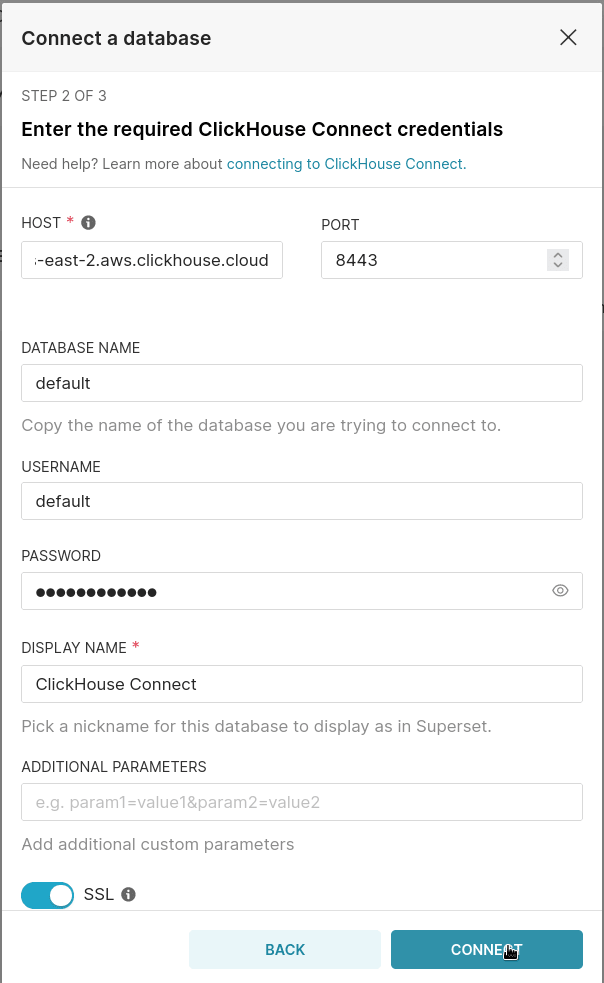
To connect to ClickHouse with HTTP(S) you need this information:
| Parameter(s) | Description |
|---|---|
HOST and PORT |
Typically, the port is 8443 when using TLS or 8123 when not using TLS. |
DATABASE NAME |
Out of the box, there is a database named default, use the name of the database that you want to connect to. |
USERNAME and PASSWORD |
Out of the box, the username is default. Use the username appropriate for your use case. |
The details for your ClickHouse Cloud service are available in the ClickHouse Cloud console. Select a service and click Connect:
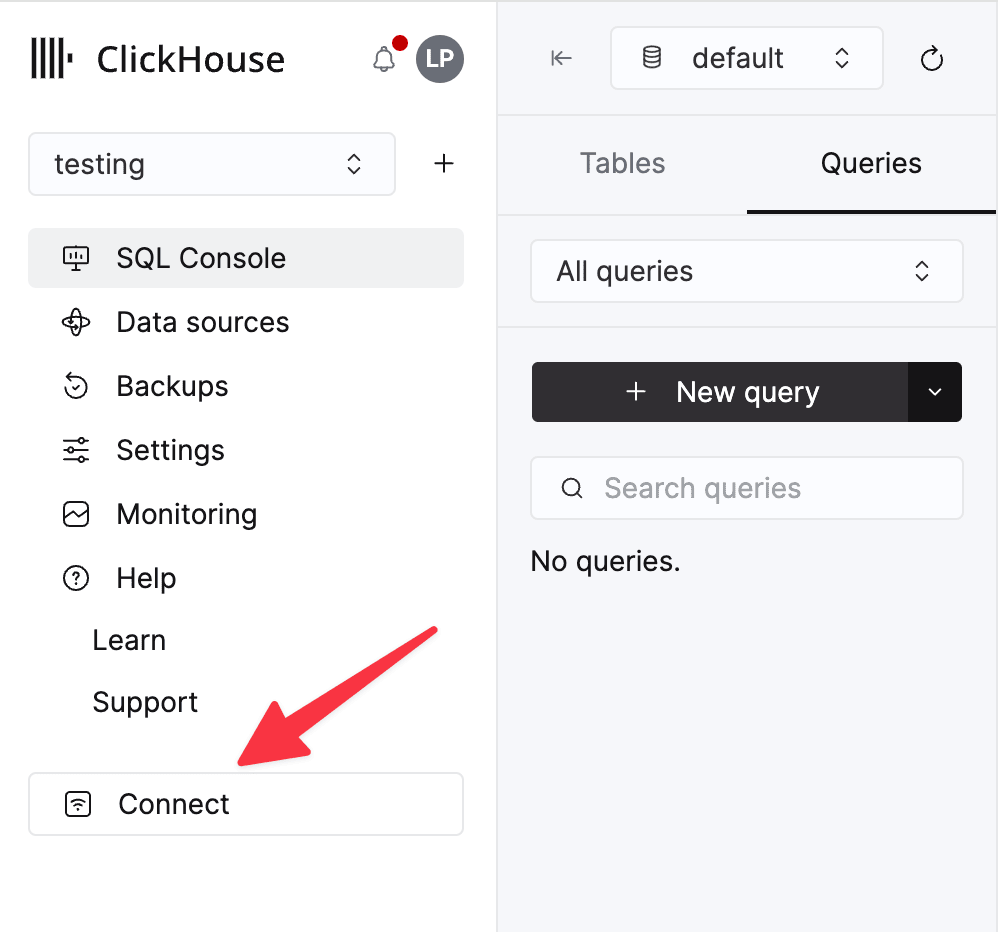
Choose HTTPS. Connection details are displayed in an example curl command.
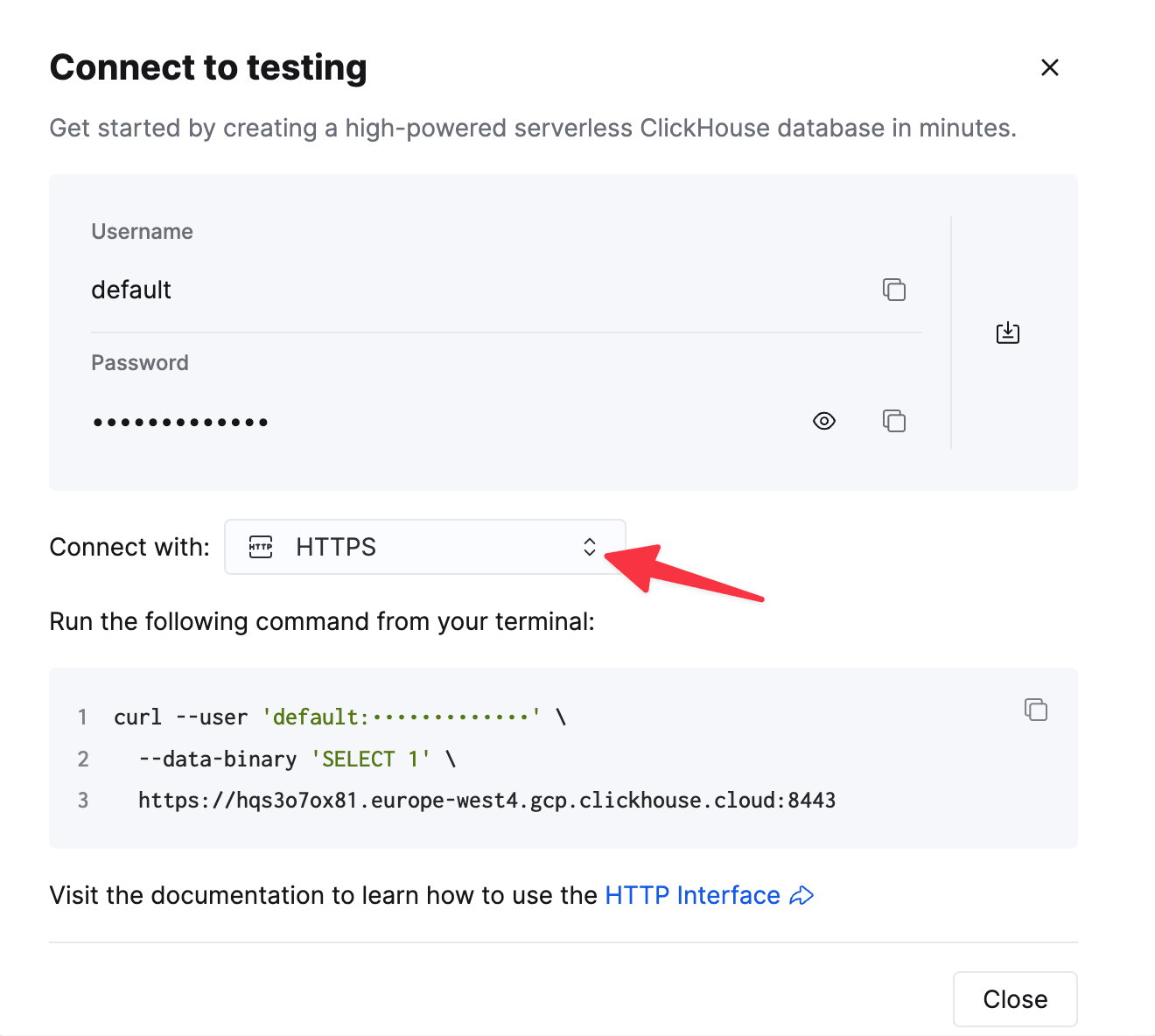
If you’re using self-managed ClickHouse, the connection details are set by your ClickHouse administrator.
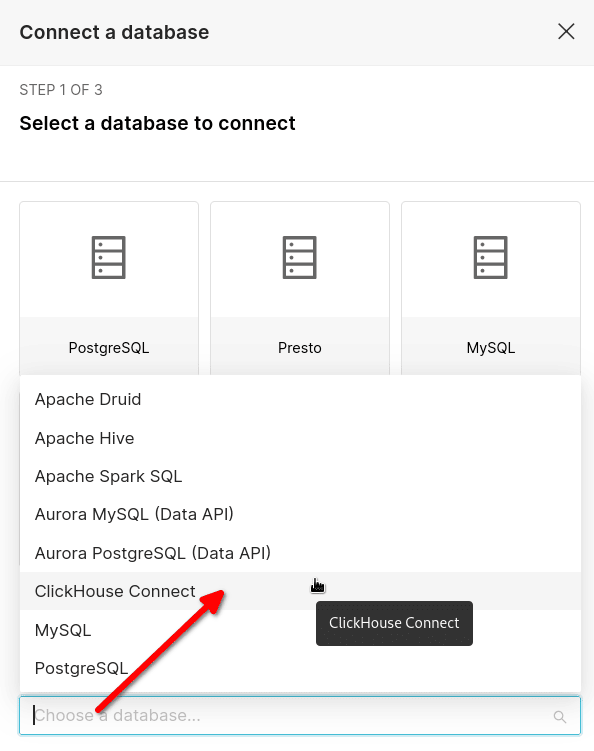
In Superset a database can be added by choosing the database type, and then providing the connection details. Open Superset and look for the +, it has a menu with Data and then Connect database options.
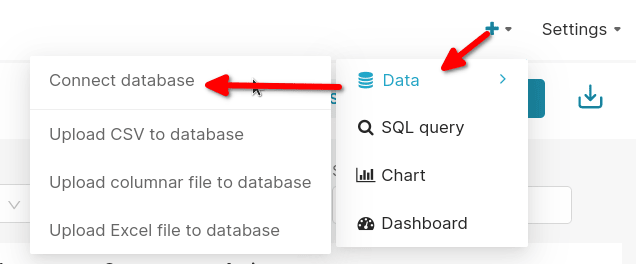
Choose ClickHouse Connect from the list:
Add your connection details
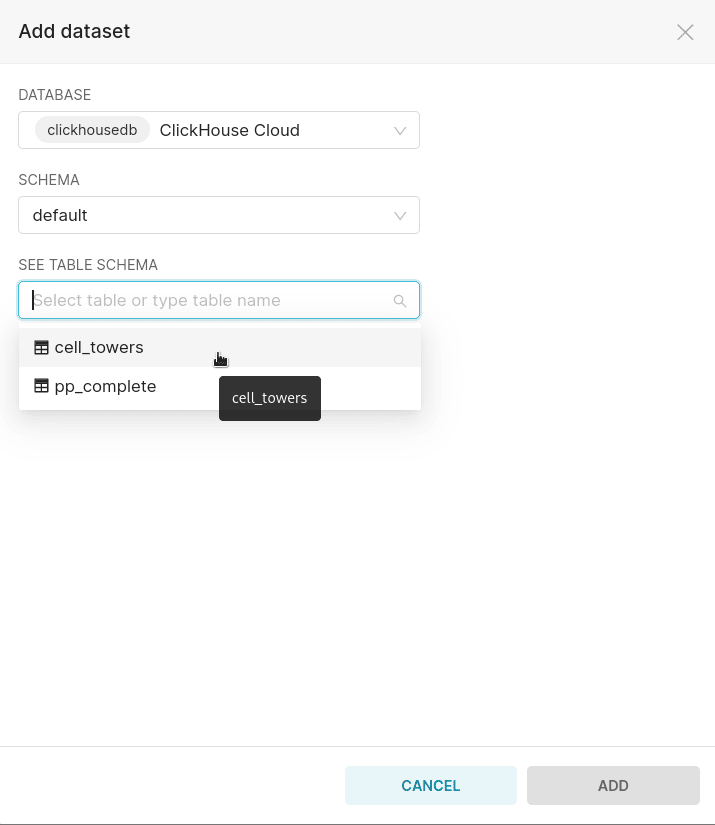
Add the table cell_towers as a Superset dataset
In Superset a dataset maps to a table within a database. Click on add a dataset and choose your ClickHouse service, the database containing your table (default), and choose the cell_towers table:
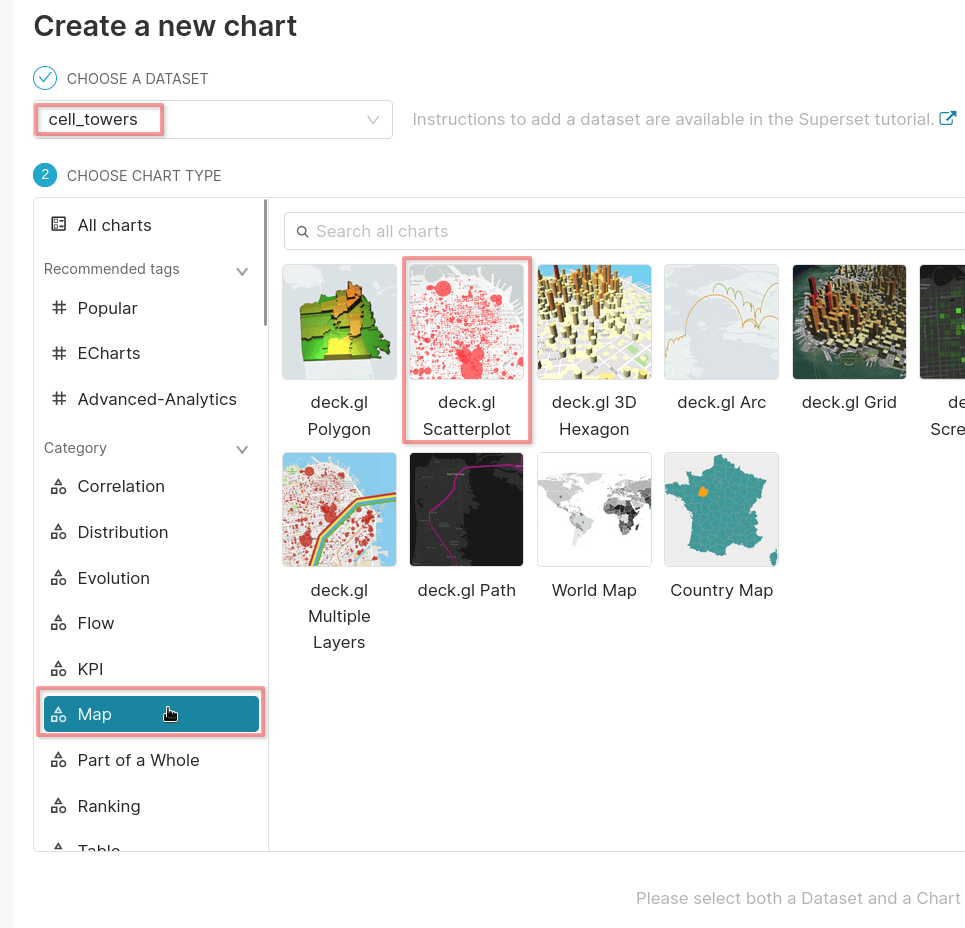
Create some charts
When you choose to add a chart in Superset you have to specify the dataset (cell_towers) and the chart type. Since the OpenCelliD dataset provides longitude and latitude coordinates for cell towers we will create a Map chart. The deck.gL Scatterplot type is suited to this dataset as it works well with dense data points on a map.
Specify the query used for the map
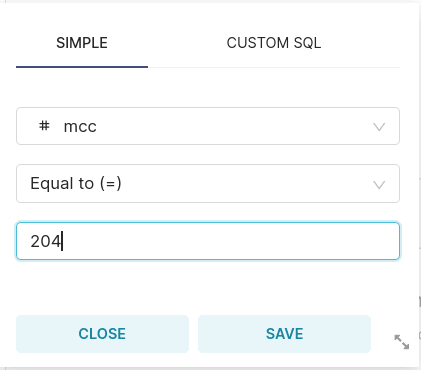
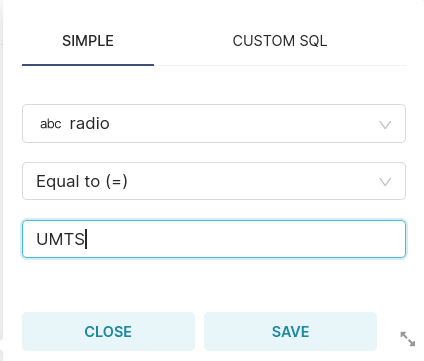
A deck.gl Scatterplot requires a longitude and latitude, and one or more filters can also be applied to the query. In this example two filters are applied, one for cell towers with UMTS radios, and one for the Mobile country code assigned to The Netherlands.
The fields lon and lat contain the longitude and latitude:
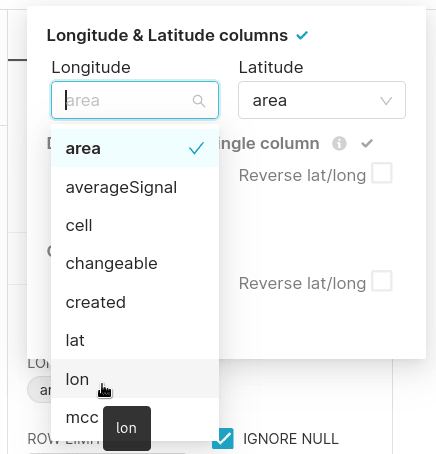
Add a filter with mcc = 204 (or substitute any other mcc value):
Add a filter with radio = 'UMTS' (or substitute any other radio value, you can see the choices in the output of DESCRIBE TABLE cell_towers):
This is the full configuration for the chart that filters on radio = 'UMTS' and mcc = 204:
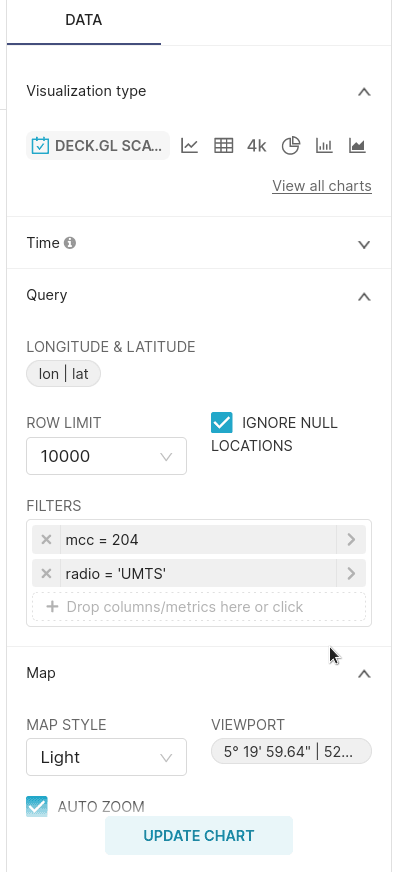
Click on UPDATE CHART to render the visualization.
Add the charts to a dashboard
This screenshot shows cell tower locations with LTE, UMTS, and GSM radios. The charts are all created in the same way, and they’re added to a dashboard.