Set up docs MCP
Introduction
The LAION 5b dataset contains 5.85 billion image-text embeddings and
associated image metadata. The embeddings were generated using Open AI CLIP model ViT-L/14. The
dimension of each embedding vector is 768.
This dataset can be used to model design, sizing and performance aspects for a large scale, real world vector search application. The dataset can be used for both text to image search and image to image search.
Dataset details
The complete dataset can be downloaded using opendatalab/laion5b-downloader.
ClickHouse has made available a subset of 10 million vectors in a public S3 bucket.
The subset is stored in one Parquet file.
We recommend users first run a sizing exercise to estimate the storage and memory requirements for this dataset by referring to the documentation.
Steps
Create table
Create the laion_5b_10m table to store the embeddings and their associated attributes:
CREATE TABLE laion_5b_10m
(
    id UInt32,
    image_path String,
    caption String,
    NSFW Nullable(String) default 'unknown',
    similarity Float32,
    LICENSE Nullable(String),
    url String,
    key String,
    status LowCardinality(String),
    width Int32,
    height Int32,
    original_width Int32,
    original_height Int32,
    exif Nullable(String),
    md5 String,
    vector Array(Float32) CODEC(NONE)
) ENGINE = MergeTree ORDER BY (id)
The id is just an incrementing integer. The additional attributes can be used in predicates to understand
vector similarity search combined with post-filtering/pre-filtering as explained in the documentation
Load data
To load the dataset, run the following SQL statement:
INSERT INTO laion_5b_10m SELECT * FROM s3('https://clickhouse-datasets.s3.amazonaws.com/laion-5b/laion5b_100m_part_1_of_10.parquet', NOSIGN);The loading of 10 million rows into the table will take a few minutes.
Run a brute-force vector similarity search
KNN (k - Nearest Neighbours) search or brute force search involves calculating the distance of each vector in the dataset to the search embedding vector and then ordering the distances to get the nearest neighbours. We can use one of the vectors from the dataset itself as the search vector. For example:
SELECT id, url
FROM laion_5b_10m
ORDER BY cosineDistance( vector, (SELECT vector FROM laion_5b_10m WHERE id = 9999) ) ASC
LIMIT 20

The vector in the row with id = 9999 is the embedding for an image of a Deli restaurant.
Note down the query latency so that we can compare it with the query latency of ANN (using vector index). With 10 million rows, the above query without a vector index could take a few seconds/minutes to complete.
Build a vector similarity index
Run the following SQL to define and build a vector similarity index on the vector column of the laion_5b_10m table:
ALTER TABLE laion_5b_10m ADD INDEX vector_index vector TYPE vector_similarity('hnsw', 'cosineDistance', 768, 'bf16', 64, 512);

ALTER TABLE laion_5b_10m MATERIALIZE INDEX vector_index SETTINGS mutations_sync = 2;
The parameters and performance considerations for index creation and search are described in the documentation.
The statement above uses values of 64 and 512 respectively for the HNSW hyperparameters M and ef_construction.
You need to carefully select optimal values for these parameters by evaluating index build time and search results quality
corresponding to selected values.
Building and saving the index can take significant time for the 10 million row subset, depending on the number of CPU cores available and the storage bandwidth.
Perform ANN search
Once the vector similarity index has been built, vector search queries will automatically use the index:
SELECT id, url
FROM laion_5b_10m
ORDER BY cosineDistance( vector, (SELECT vector FROM laion_5b_10m WHERE id = 9999) ) ASC
LIMIT 20
The first time load of the vector index into memory could take a few seconds/minutes.
Generate embeddings for search query
The LAION 5b dataset embedding vectors were generated using OpenAI CLIP model ViT-L/14.
An example Python script is provided below to demonstrate how to programmatically generate
embedding vectors using the CLIP APIs. The search embedding vector
is then passed as an argument to the cosineDistance() function in the SELECT query.
To install the clip package, please refer to the OpenAI GitHub repository.
import torch
import clip
import numpy as np
import sys
import clickhouse_connect

device = "cuda" if torch.cuda.is_available() else "cpu"
model, preprocess = clip.load("ViT-L/14", device=device)

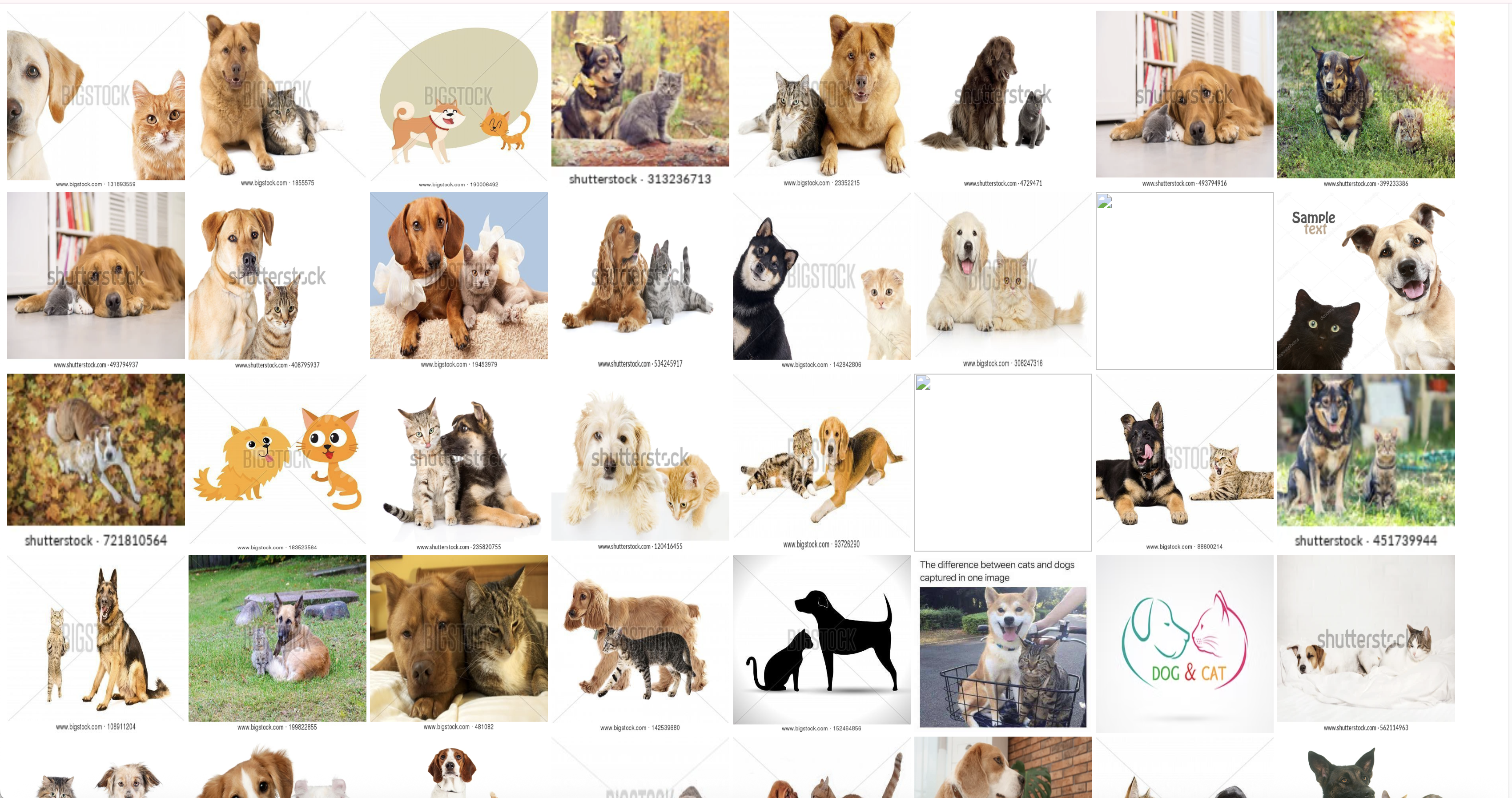
# Search for images that contain both a dog and a cat
text = clip.tokenize(["a dog and a cat"]).to(device)

with torch.no_grad():
    text_features = model.encode_text(text)
    np_arr = text_features.detach().cpu().numpy()

    # Pass ClickHouse credentials here
    chclient = clickhouse_connect.get_client()

    params = {'v1': list(np_arr[0])}
    result = chclient.query("SELECT id, url FROM laion_5b_10m ORDER BY cosineDistance(vector, %(v1)s) LIMIT 100",
                            parameters=params)

    # Write the results to a simple HTML page that can be opened in the browser. Some URLs may have become obsolete.
    print("<html>")
    for r in result.result_rows:
        print("<img src = ", r[1], 'width="200" height="200">')
    print("</html>")
The result of the above search is shown below: